All scam types / Told that something is wrong
Fake GitHub notifications
Someone tags you in a GitHub issue, comment or repository. GitHub sends you a real email, but the message in it is a scam: an airdrop, a security alert or a job.
Targets: Developers with a public GitHub account · Last seen Nov 2, 2026
Red flags
- A notification about a repository, issue or organization that you do not know.
- Your name is one of many names tagged in the same issue or comment.
- A reward or airdrop that you must claim with your wallet, from a GitHub link.
- A "security alert" in an issue or a discussion. GitHub shows real security alerts in your account settings, not in an issue.
- A page that asks you to authorize an OAuth app with access to your repositories.
How it works
- The scammer opens an issue, a comment, a discussion or a commit, and tags (@) you and many other developers. Or the scammer adds you to a repository.
- GitHub sends you a real email from notifications@github.com. The email contains the scammer's text.
- The text says you won a token airdrop or a developer reward, that someone used your account, that a tool has a severe vulnerability, or that a company wants to hire you.
- The link opens a fake claim page that empties your wallet, a fake GitHub login or app authorization that takes your account, or a "patch" that is malware.
Protect yourself
- Do not open links in a GitHub notification from an unknown repository or user.
- To check an alert, go to github.com yourself and look at Settings > Security log.
- Find airdrops only on the project's official site or its verified account.
- Do not authorize an OAuth app or install a GitHub App that you did not look for.
- Report the issue or the user to GitHub. Unsubscribe from the repository.
If it happened to you
- If you connected a wallet or signed something, revoke the approvals and move the funds to a new wallet.
- If you authorized an app, go to Settings > Applications and revoke it. Then change your password and your tokens.
- If you ran a downloaded file, follow the steps for malware: use a clean device and move your funds.
Take the quiz for this scam 3 questions, about one minute
Real examples (14)
-
Fake OpenClaw $5k token airdrop sent to developers via GitHub mention notifications, redirecting to a wallet-draining phishing page.


-
Mass-posted fake 'VS Code severe vulnerability' GitHub Discussions delivered via notifications, linking to a Google Drive patch / redirecting to drnatashachinn.com.

-
Phishing email mimicking a GitHub notification from Y Combinator led to lookalike domain y-comblnator.com with a wallet connect page.


-
An AI agent from SoneVibe flagged a GitHub notification containing a wallet drainer as phishing, without opening any links, and the account was reported.
-
A fake github-actions bot comment on a GitHub issue pushes a 'Live Support Team' link to a fake support chat designed to get wallet connections, signatures or seed phrases.

-
Fake repo Claim-Hermes/Hermes mentioned dozens of accounts, triggering real GitHub notification emails pushing a fake Hermes (Nous Research) claim.

-
Fake Foundry airdrop scam on GitHub mass-mentioned users and was taken down after about 45 minutes.
-
Wave of phishing emails impersonating Aave and Gitcoin with GitHub notification disguises and staking offers redirect to a lookalike site.


-
Phishing email disguised as a GitHub notification about a fake Gitcoin Developer Fund led to a site requesting a wallet-draining transaction.


-
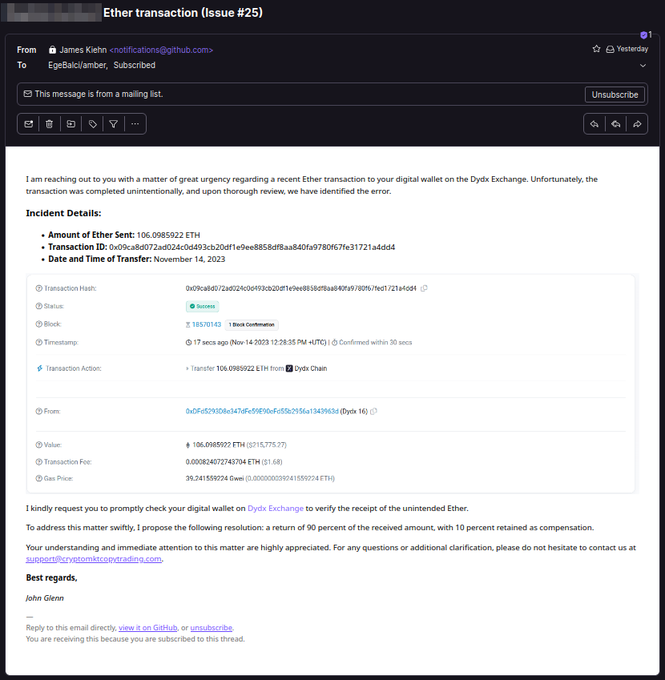
Threat actors use GitHub issues to trigger notification emails to repo owners that push crypto scams.
4 more examples in the full guide.